Rebook Report
Location: Reports > Appointment & Client Reports
The Rebook Report helps you track how often clients rebook appointments, broken down by Company Rebook and Worker Rebook. The report can be exported or printed for your records.
Rebook Definitions
- Company Rebook - When the client schedules a future appointment with anyone in the company (including the same worker) before midnight on the same day as the completed ticket. The appointment can be a standing, online booked or booked by the business.
- Worker Rebook - When the client schedules a future appointment with the same worker before midnight on the same day as the completed ticket. The appointment can be a standing, online booked or booked by the business.

Appointments can be standing, online bookings, or scheduled by the business.
How to Generate the Report
- Enter a Begin Date and End Date
- Select to run the report by:
- Company
- Individual Worker
- Click Generate
Sorting Options 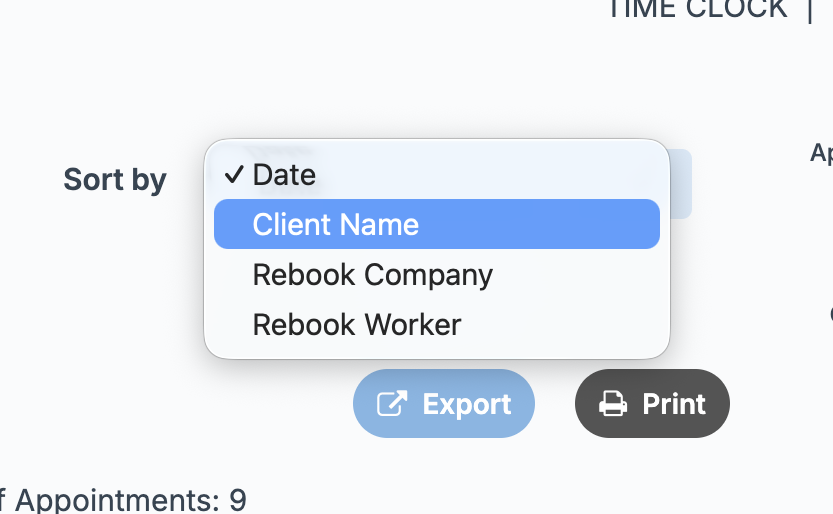
You can organize the report by:
- Date – Displays from most recent completed appointment to oldest
- Client Name – Alphabetical order by client’s first name
- Rebook Company –
- Clients who met the company rebook requirement appear first
- Followed by clients who did not
- Rebook Worker –
- Clients who met the worker rebook requirement appear first
- Followed by clients who did not

This report is based on completed tickets only.
Summary Totals (Top of Table) 
When running the report by Company:
- Company Rebooked Appointments – Total number within the selected date range
- Total # of Appointments – Total completed appointments
- Company Rebooked (%) – Percentage of appointments that were rebooked
When running the report by Individual Worker: 
- Company Rebooked Appointments – Total number within the selected date range
- Total # of Appointments – Total completed appointments
- Company Rebooked (%) – Percentage of appointments rebooked within the company
- Worker Rebooked Appointments – Total number rebooked with the same worker
- Worker Rebooked (%) – Percentage rebooked with the same worker
 An appointment is considered a rebook if it is scheduled before midnight on the same day as the completed appointment.
Note: A client can be counted as both a Company Rebook and a Worker Rebook if the appointment meets the requirements for each.