Basic Payroll Report
Location: Reports > Compensation Reports
The Basic Payroll Report is a great tool for businesses that have simple payroll structures that align with the Setup Basic Payroll area. For more complex payroll methods, please consider using the Process Compensation and Setup Compensation Methods / Scales area.
This report can be printed or exported at any point in time.
To generate this report:
- Select the Pay Schedule
- Select the Date Range
- Click Generate
Report Filters & Sorting
Pay Schedule
Select if you would like to generate the report for workers set to:
- On Demand
- Weekly
- Biweekly
Sort By
The report can be sorted using the Sort By drop-down menu.
- Worker Name — Displays the table in alphabetical order by the worker’s first name.
- Worker ID — Displays the table in descending order by Worker ID. If no Worker ID is assigned, the table will display alphabetically, then by Worker ID.
- Service Total — Displays the table in ascending order by Service Total.
- Product Total — Displays the table in descending order by Product Total.
- Hours — Displays the table in ascending order by Regular Hours.
- Regular Pay — Displays the table in descending order by Total Pay.
- OT Hours — Displays the table in ascending order by Overtime Hours.
- OT Pay — Displays the table in ascending order by Overtime Pay.
Table Groupings 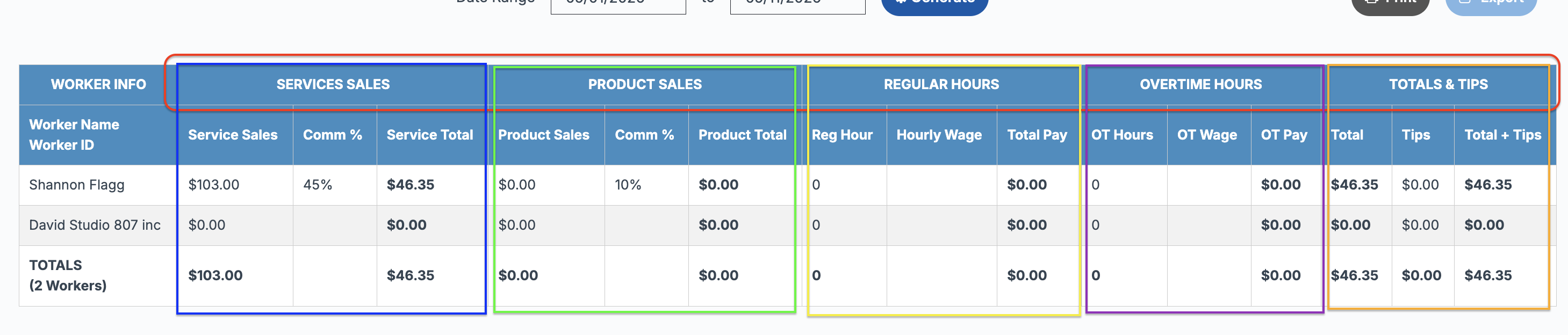
The Basic Payroll Report table is grouped into the following payroll categories for easier review and organization:
- Service Sales
- Product Sales
- Regular Hours
- Overtime Hours
- Totals & Tips
Each grouping contains related payroll columns to help quickly review payroll calculations and worker totals.
Column Descriptions 
- Worker Info - Worker Name and Worker ID will appear based on the selected Sort By option.
- Service Sales - The total amount in service sales (minus refunds deducted) for the selected date range. It will calculate using Set Price or Paid Price, whichever is selected in Setup Basic Payroll.
- Comm % - The Service Commission value from Setup Basic Payroll or Setup Worker Details.
- Service Total - The Service Sales multiplied by the Service Commission %. If Deduct Service Fee is enabled, the service fee will be deducted from the Service Sales before multiplying by the Service Commission %.
- Product Sales - The total amount in product sales (minus refunds deducted) for the selected date range. It will calculate using Set Price or Paid Price, whichever is selected in Setup Basic Payroll.
- Comm % - The Product Commission value from Setup Basic Payroll or Setup Worker Details.
- Product Total - The Product Sales multiplied by the Product Commission %.
- Reg Hour - The total amount of hours worked within the selected date range, limited to the overtime value per day or week.
- Hourly Wage - The Hourly Wage value from Setup Basic Payroll or Setup Worker Details.
- Total Pay - The Regular Hours multiplied by the Hourly Wage.
- OT Hours - The total number of hours worked when overtime is applied either daily or weekly.
- OT Wage - The Overtime Hourly Wage value from Setup Basic Payroll or Setup Worker Details.
- OT Pay - Overtime Hours multiplied by Overtime Wage.
- Total - The Service Total, Product Total, Total Pay, and OT Pay added together.
- Tips - The total amount of Tips Left In Drawer and Tips Paid Out.
- Total + Tips - The Total plus Tips.
 Note: Service Sales and Product Sales totals will reflect amounts after any refunds have been deducted.
Totals Row
At the bottom of the table, a Totals row will display summarizing all workers included in the report. Totals include:
- Total number of workers
- Total Service Sales
- Total Service Total
- Total Product Sales
- Total Product Total
- Total Regular Hours
- Total Pay
- Total OT Hours
- Total OT Pay
- Total Total
- Total Tips
- Total Total + Tips
This Totals row represents the combined totals for all workers displayed within the report table.

Quick Note: To update a worker’s Pay Schedule, Hourly Wage, OT Hourly Wage, Service Commission, or Product Commission, visit:
- Setup > Setup Basic Payroll